Headlines touting "Low-Latency Streaming" and now "Ultra Low-Latency Streaming" are everywhere these days—in promotional brochures, streaming service presentations, and at industry trade show booths. It seems like every transcoding and restreaming vendor now claims to support low-latency broadcasting. Unfortunately, there’s usually very little substance behind the marketing hype. At best, you might see a flashy number like "200 ms" or "500 ms," even though it’s obvious that a single product can't deliver those metrics across every single use case. Furthermore, there are basically no strict international standards defining these terms. Real-world latency depends on a multitude of factors, even when the signal is transmitted in a fully controlled environment.
Articles on this topic often focus purely on the final step—the delivery protocol—labeling it a "low-latency protocol" while ignoring all the other stages of video processing. In reality, the combined delay from signal capture, compression, media container packaging, reception, and decoding can be several times longer than the delivery time itself.
In this article, we’ll break down what those marketing claims actually mean in practice, look at what makes up video processing and delivery times, discuss when chasing milliseconds is actually worth it, and explore the hidden costs behind it all.
Clearing Up the Terminology
The most recent attempt to sort out the terminology for (ultra) low-latency broadcasting was made by the Streaming Video Technology Alliance (SVTA) in 2025, driven by its Low-Latency Streaming Working Group. This group includes reps from companies like Elecard, TAG Video Systems, Sky, IMAX, and others. They surveyed industry professionals on various aspects of low-latency streaming. The survey gathered 102 responses—maybe not a massive sample size, but enough to give us a solid read on the industry's mindset. You can check out the full report here: https://www.svta.org/product/svta7111.
According to the survey, a significant portion of the market (44%) is still operating with latencies between 10 and 40 seconds. Another 24% fall into the 2–10 second range, and 28% have managed to drop below 2 seconds. However, the vast majority (86% of respondents) have set a goal of pushing latency below the 5-second mark.
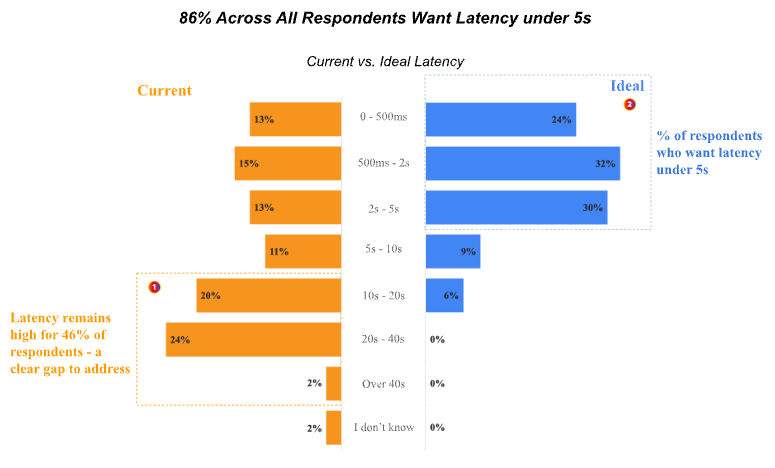
As we can see, there’s still a huge gap between the tech currently used in the industry and user expectations. And those expectations vary wildly depending on the type of content.
For example, a few seconds of delay is perfectly fine for watching the news or entertainment shows. But sports broadcasts are a different story: no one wants to get a goal notification on their phone before they actually see it happen on their TV. Even here, though, there’s no single magic number that defines "low latency." For standard OTT streaming, five seconds might be a great result. A custom-built IPTV setup might aim for one second. Meanwhile, certain professional use cases demand 250–300 milliseconds.
Clearly, throwing around the term "Low Latency" without specifying the exact milliseconds, how it’s measured, and the conditions required to achieve it tells us almost nothing about a system’s actual technical capabilities.
What Actually Makes Up Broadcast Latency?
Let's look at some typical video delivery pipelines:
- In DVB, the chain usually looks like this: SDI source → A/V encoders → TS multiplexer → TS transmission over UDP to a DVB modulator → reception on a TV or Set-Top Box (STB).
- For classic multicast IPTV, the setup is similar but drops the DVB modulator. The TS is transmitted directly over an IP network to the TV or STB.
- In OTT, the encoder is followed by a packager, an Origin server, a CDN, and finally, the client player—which downloads segments, selects the right quality profile, and manages its own buffer.
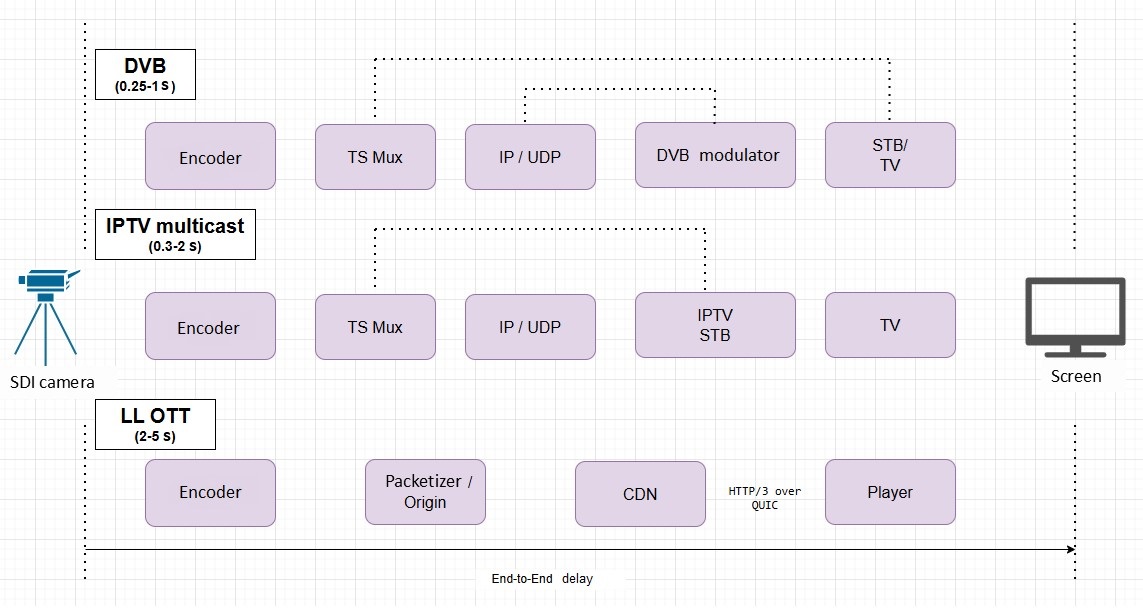
Every stage of video processing and delivery introduces a certain amount of delay—and most of the time, it’s there for a good reason. Some buffers exist to compress the video more efficiently, others synchronize elementary streams, smooth out transmission spikes, or ensure stable playback on the viewer's end.
That’s why solving the low-latency puzzle isn't just about picking the right delivery protocol. It’s about figuring out exactly how much buffer time is strictly necessary at each stage—and how much you can trim the fat without breaking the system.
Lookahead
One of the biggest culprits of delay during video encoding is lookahead—the analysis of future frames. The encoder buffers a certain number of incoming frames, evaluates their complexity, and uses that data to allocate bitrate more efficiently. For instance, if a highly complex, bitrate-heavy scene is coming up, the encoder might save bits by slightly limiting the data used for the preceding frames.
Conceptually, it’s a bit like the two-pass encoding used for VOD files, though it’s not an exact match. When encoding files, the first pass can analyze the entire video. In live broadcasting, the encoder only has a small window of future frames to work with.
The size of this window depends on your encoding settings. Let’s say your lookahead is set to 50 frames at 25 fps. That means the encoder has to hold onto two full seconds of video just to analyze future frames. That single process alone can blow right past your entire latency budget.
You can usually turn lookahead off completely in the encoder settings. But there’s a trade-off: your compression efficiency takes a hit. At the same bitrate, the image quality will likely drop; to keep it looking good, you’ll have to crank up the bitrate. It’s also worth noting that the quality boost you get from lookahead really depends on the content—it’s most noticeable in complex, high-motion video.
Sports broadcasts, for example, are full of complex motion, fine details, and rapid scene changes. It’s exactly the kind of content where analyzing future frames would be incredibly helpful for maintaining quality. Paradoxically, these are the very streams that demand the absolute lowest latency.
B-frames
Another source of latency is the use of B-frames.
B-frames allow for inter-frame prediction using not just past frames, but future ones as well. This boosts compression efficiency, but it means the system has to wait to receive the future frame it needs to reference.
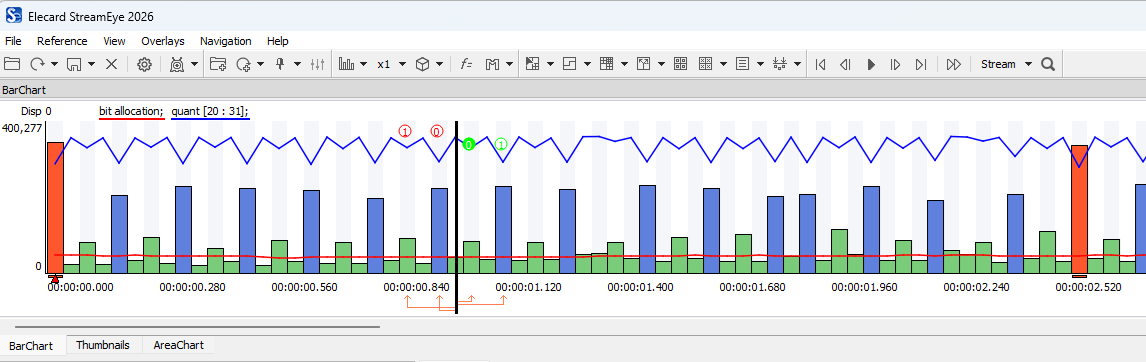
Imagine a B-frame is referencing a frame that appears three slots ahead in the display order. At 25 fps, a single frame lasts 40 ms. That means this prediction structure needs about 120 ms of "future" video. For standard broadcasting, that’s no big deal. But if your target latency is 200–300 ms, just waiting around for that future reference frame eats up a massive chunk of your time budget.
This delay is hardwired into the GOP (Group of Pictures) structure and will still happen even if you’ve disabled lookahead. You could reduce the number of B-frames to just one, or ditch them entirely. But we run into the same old compromise: you gain lower latency, but you pay for it with worse compression efficiency.
Multiplexing and A/V Synchronization
The TS (Transport Stream) multiplexer also adds its own delay to the mix. Multiplexing itself isn’t a heavy lift computationally—it happens fast. The delay here mostly comes from needing to sync up multiple elementary streams (audio, video, subtitles, etc.) so they all arrive at the receiver at the exact same time.
Even if audio and video come from the same SDI source, they are encoded independently. Because of this, the matching audio and video frames might show up at the multiplexer's input at different times. When building the TS, the multiplexer has to interleave the data carefully: every stream needs to reach the receiver before the decoder asks for it, but not so early that it overflows the receiver's buffers.
Over on the STB side, there are separate buffers for audio and video, and their capacity is limited. Because of this, you can't just arrange the timing of the data in the transport stream however you feel like it.
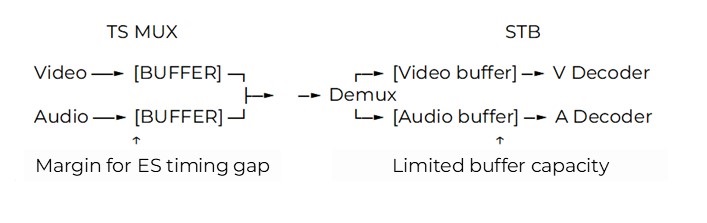
If the incoming elementary streams have a large timing gap, the multiplexer might need a bigger buffer to handle it. The alternatives are either tightening up that timing gap during the earlier stages or beefing up the buffer on the receiver side.
For context, let's look at a real TS analyzed in Elecard Stream Analyzer. The Time Dynamics chart shows the PTS (Presentation Time Stamp) difference between the selected audio and video streams. In this specific clip, that gap reaches a whopping three seconds.

As a practical rule of thumb, the PTS difference should stay under one second. Anything more can lead to muxing and playback issues. By shrinking the buffer size in the multiplexer, we leave ourselves less wiggle room for syncing the elementary streams, which in turn means the streams have to be prepped far more strictly beforehand.
Transmitting the Transport Stream to the Network
Another layer of latency is added when forming the UDP stream at the output. Interestingly, the UDP protocol itself isn't a major bottleneck. The issue is that data coming out of the encoder and multiplexer often hits the network interface in bursts. If you transmit that data immediately without pacing it, those bursts translate directly into jittery UDP traffic.
To evaluate the stream's timing structure, we look at Inter-packet Arrival Time (IAT)—the time interval between the arrival of consecutive packets.
In one of our tests, with the output buffer completely disabled, Elecard Boro clocked peak IAT values somewhere in the 200–400 ms range:

DVB modulators need data to arrive at a highly predictable rate, so this kind of erratic input stream structure is often a dealbreaker for them.
To bring the IAT down at the network output, systems use rate control and an extra buffer. This allows them to accumulate a bit of data and release it at a smoother, more even pace.
In that same test, we compared three different output buffer settings while keeping everything else the same. With a zero buffer, the Max IAT sat around 200–400 ms. Upping the buffer to 700 ms dropped the IAT down to about 10–20 ms. When we pushed the buffer up to 1400 ms, the vast majority of readings hovered at a silky smooth 3–4 ms, with only a few minor spikes.
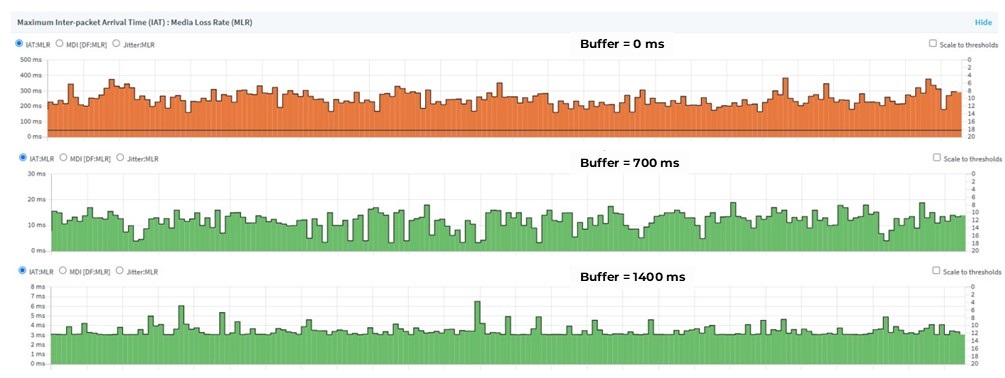
From a stream smoothness perspective, that last setup looks like the winner. But the price of that smoothness is an extra 1400 ms of delay—which is completely unacceptable if your goal is low-latency broadcasting.
At this stage of signal processing, the goal isn't necessarily to achieve the lowest possible IAT. The goal is to find the absolute minimum buffer size that smooths the stream just enough to keep the downstream equipment happy. Professional transcoding, multiplexing, and streaming solutions let you tweak all of these parameters manually.
Latency in OTT
OTT throws even more latency sources onto the pile: creating segments, publishing them to the Origin server, delivering them via a CDN to the client, and finally, buffering inside the player itself.
In traditional HLS and DASH, the player works with fixed-length segments (usually between 2 and 10 seconds). It hoards a few of these segments in its buffer to ensure smooth playback without buffering screens. Because of this, even if you’ve got incredibly fast encoding settings, your total latency can easily stretch into the dozens of seconds.
This is where Low Latency (LL) versions of HLS and DASH come in. They allow the system to transmit and play back tiny chunks of a segment without waiting for the whole segment to finish rendering.
Implementing Low-Latency OTT in Elecard CodecWorks
Let’s look at a practical example from a real project: setting up LL-OTT stadium broadcasting in the US during one of the biggest football events in the world. The task was to prep four OTT channels for VIP suites to watch on tablets, with the lowest possible latency. On top of that, viewers still needed the ability to rewind the live feed for up to four hours.
The Elecard solution used a CodecWorks server that ingested SDI signals, encoded the video, packaged it into LL-DASH, and distributed the stream to client players. We managed to hit that low latency primarily by breaking the segments down into smaller chunks, making them available to the player well before the full segment was generated and downloaded.
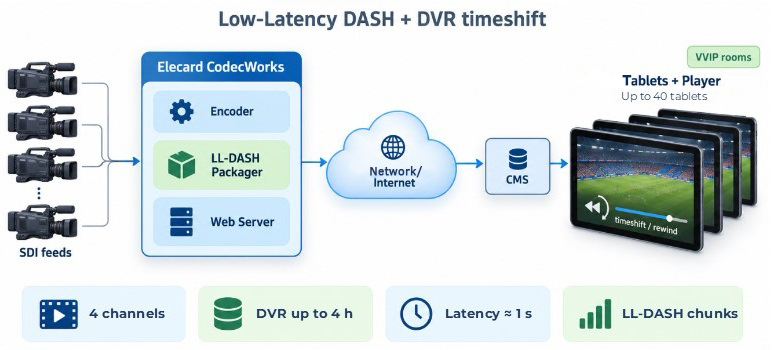
During internal testing using THEO Player on tablets, we measured a delay of roughly one second between the SDI source and actual playback. For OTT, that’s a fantastic result. However, it’s worth noting that the system was built for a small, exclusive audience (up to 40 tablets) operating on a completely controlled network.
You can’t just copy-paste those exact same settings for thousands of users connecting over the public internet and expect it to work. A tiny player buffer that delivers one-second latency on a local network will result in constant buffering and stuttering if the internet delivery gets even slightly unstable. That is one of the fundamental differences between low latency in a closed professional broadcast environment and low latency for mass-market OTT.
In a fully controlled infrastructure, we can cherry-pick the hardware, fine-tune the buffers, and cap the number of viewers. Mass broadcasting over the public internet is a whole different beast: users have varying devices, wildly different bandwidths, and different software player capabilities. For mass OTT, just shortening the segments or killing the buffers isn't enough. You have to maintain system stability in an environment where delivery conditions are constantly fluctuating.
One of the ways LL-OTT is evolving is by tightening the integration between the delivery mechanism and the app logic. For example, HTTP/3 uses the QUIC transport protocol over UDP, which lets the app pull real-time connection status data and, in some setups, manage data transmission much more flexibly. However, all these shiny new LL-OTT tools only work if they are fully supported across the board—by the server, the delivery network, and the client app.
The Bottom Line
Low latency in broadcasting isn’t just a feature of a specific delivery protocol or a simple "LL preset" you click on an encoder. Total latency is the sum of delays across every single element of the pipeline—from the moment the raw image is captured to the second it lights up the viewer's screen.
Every step in that chain uses a bit of buffer time to do its specific job, and trimming that time always comes with trade-offs.
Hitting a target millisecond count in a sterile lab setup is only half the battle. The real challenge is maintaining that low latency in the wild—handling unpredictable content, messy network conditions, and thousands of different end-user devices.
So, whenever you see a claim like "Ultra Low Latency — 200 ms," the question isn't really whether the product can hit that number. The more important questions are: between which two points was it measured? Under what network conditions? And most importantly, what exactly did they have to sacrifice to get those milliseconds?
 Author
Dmitriy Shmakov is a leading engineer at Elecard. He has been working in video analysis since 2021. Dmitriy is in charge of support of the Elecard's largest clients, such as Telstra, Globo, Amagi, Innet, etc.
Elecard CodecWorks — professional platform for real-time encoding and transcoding into HEVC/H.265, AVC/H.264, and MPEG-2 video. Supports adaptive bitrate streaming via HLS, CMAF, and MPEG-DASH protocols, and is compatible with various Conditional Access Systems (CAS).